Every EPB dossier. Every deadline. Filed on time.
Bouwti manages your entire certification workflow: dossiers, statutory deadlines, site inspections, 3D plans and reporting — built for Flemish EPB/EPC offices. Geen boete zolang tijdig ingediend.
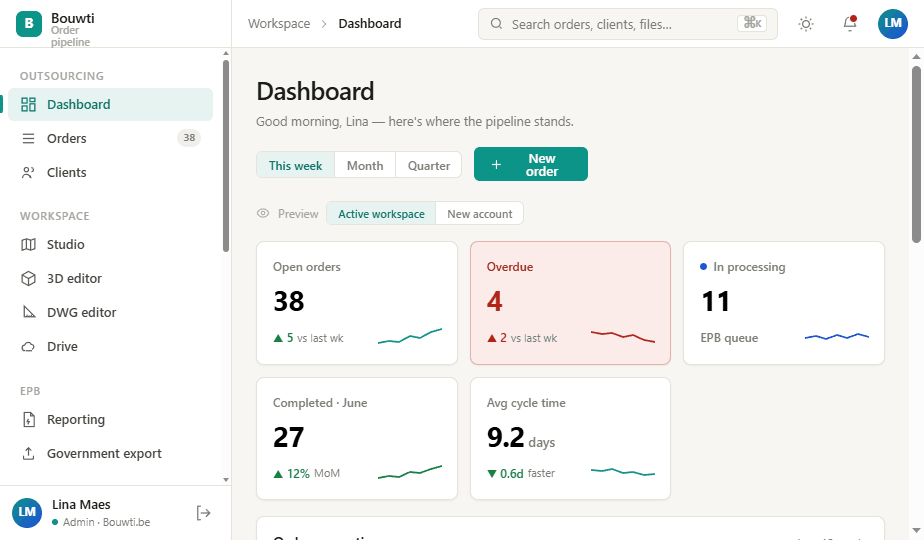
Never miss a legal deadline again.
Every dossier tracks its phases against the statutory deadlines. Bouwti flags the dossiers at risk and escalates them before a deadline passes — so late filings stop being a surprise.
Start-declaration → provisional → final, each with its own statutory clock.
Indicative exposure per dossier, based on the VEKA fine bands — so you can triage what matters first.
ok → warn → urgent → overdue, so nothing goes late in silence.
Everything an EPB office runs on — connected.
Stop stitching together email, file servers, CAD tools and the government portal. Bouwti puts the entire order around a single timeline.
Order pipeline & worklist
Track every survey from Draft → Pushed → Processing → Data ready → Completed on a pipeline that's the spine of the whole app. Work in a power-user spreadsheet or a drag-and-drop kanban board — your choice, same data.
One-click VEKA export
Push completed declarations straight to the official EPB platform and poll status back — with clear ready / sending / error states and receipts.
CAD, 3D & PDF viewers
Open DWG, SketchUp and PDF right in the browser — measure, mark up, and read EPB data off the model without leaving the order.
Self-service client portal
Clients submit requests, upload required documents and follow progress in their own Dutch-first portal — fewer emails, complete files.
Built-in collaboration
Order threads, direct messages, channels and file comments — with notifications and unread badges, so context lives next to the work.
AI that reads every file
Bouwti's AI mines every plan, PDF and document in an order — and across the whole client's history — to surface the EPB & EPC data you need, pre-filled and ready to review.
Face-to-face, without the drive
Built-in video calls — walk a client through their EPC result or brief an outsourcing partner, screen-share included, straight from the order.
EPC certificates
Generate the energy-performance certificate — label ladder, E-peil and recommendations — straight from the same data as the EPB report.
Inspection management
Plan site visits, run a structured on-site checklist and capture photos & measurements that flow straight back into the order — from the web app or the mobile app in the field.
Statistics & activity
A monthly order matrix per client, completion trends and a full audit trail — the numbers you need for capacity and billing.
See the whole workflow in action.
Click through the app the way your team will — the pipeline, the studio viewers, the client portal and the numbers behind it all.
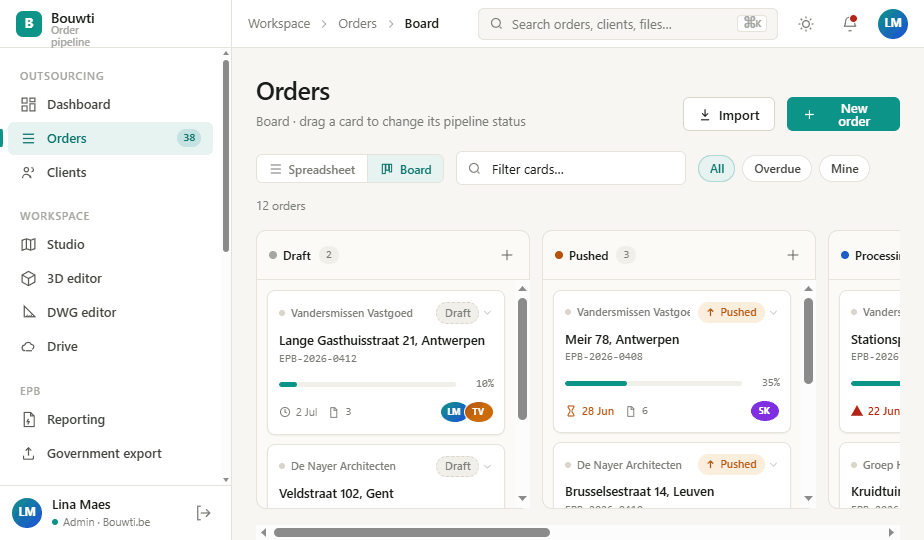
A single timeline from survey to certificate.
Every order carries its files, members, discussion and government status on one screen. The stepper shows exactly where each job is — and what's blocking it — so nothing stalls silently.
Submit and read status back automatically — no manual re-keying.
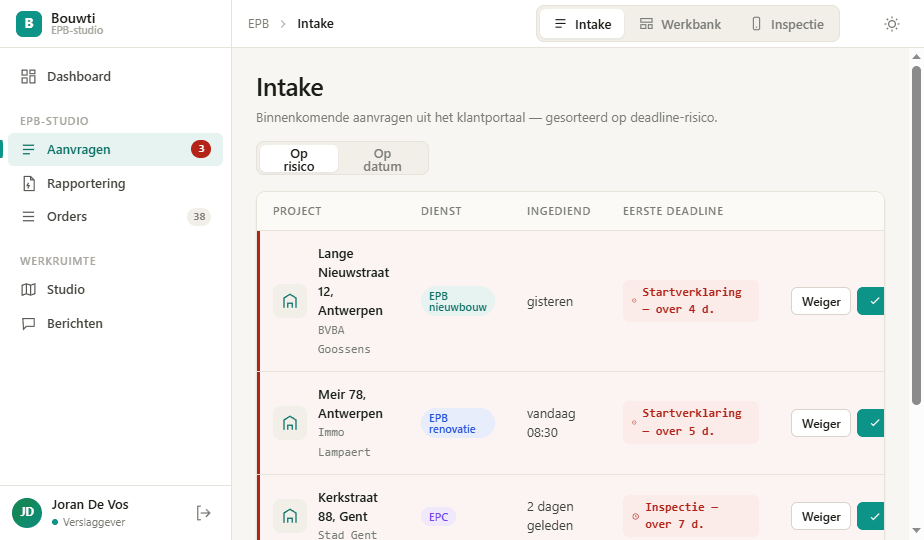
Incoming requests are sorted by VEKA-deadline risk and flagged before they're late.
Statuses use distinct shapes and glyphs, never colour alone.
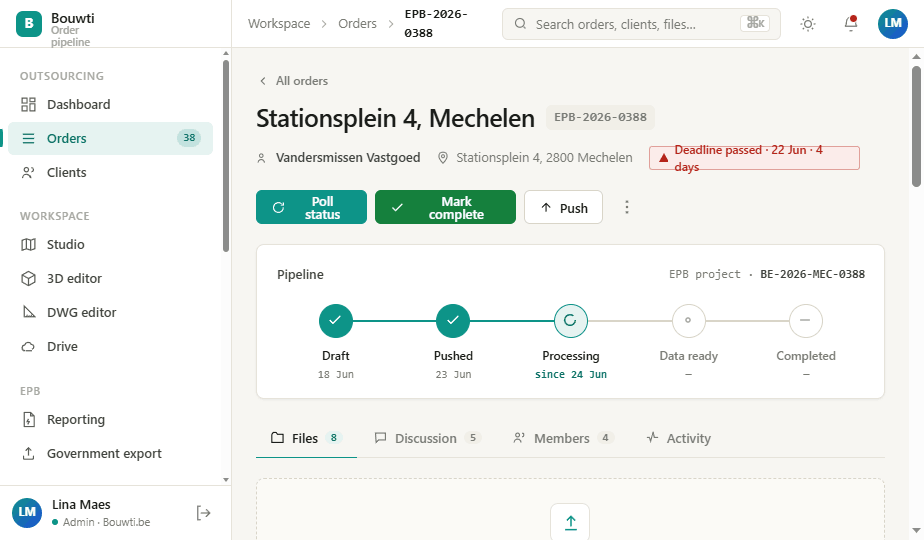
Your plans, live in the browser.
Open DWG, SketchUp and PDF files without installing anything. Measure with snapping, annotate, mark up ventilation plans, print to A3/A4 — view and edit in 2D and 3D, right inside the dossier.
videos/dwg-viewer.mp4
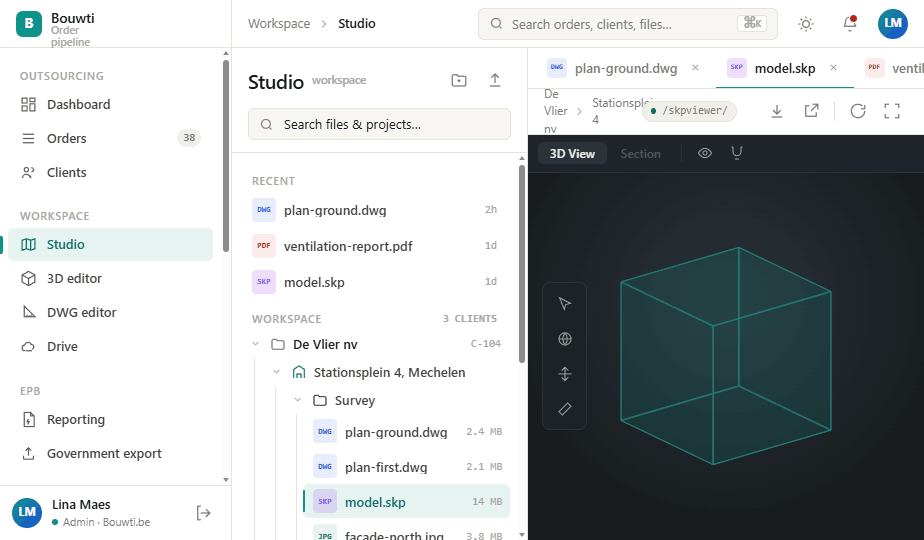
DWG viewer & editor
CAD-style ribbon with distance, area, angle and coordinate measure, layer manager, scale setting and A3/A4 print. Full Space Editor adds dimensioning and markup that persists.
3D SketchUp model viewer
Open the .skp model and orbit it in the browser with magnetic CAD snapping. Section-cut, measure and step through units → sectors → elements — no SketchUp licence, no download.
AI insight across the order
Read any PDF in place, then let the AI cross-reference every file the client has ever sent — turning scattered documents into structured EPB & EPC data.
On-site checkups — web at your desk, mobile in the field.
Plan the visit in the web app, run it on your phone on site, and let the measurements land back in the dossier before you're off the driveway. EPB and EPC inspections both.
Plan it on the web
Schedule site visits against the dossier's deadline, assign the verslaggever and pick the right checklist — EPB survey or EPC assessment. Synced to Google/Outlook calendars.
Run it on mobile
A structured checklist per building element, with photos, measurements and notes captured in the field. Works with no signal — everything queues locally and syncs when you reconnect.
Lands in the dossier
Measured values write straight into the EPB fields, photos attach to the element they document, and the inspection closes the phase — no re-typing from a notebook.
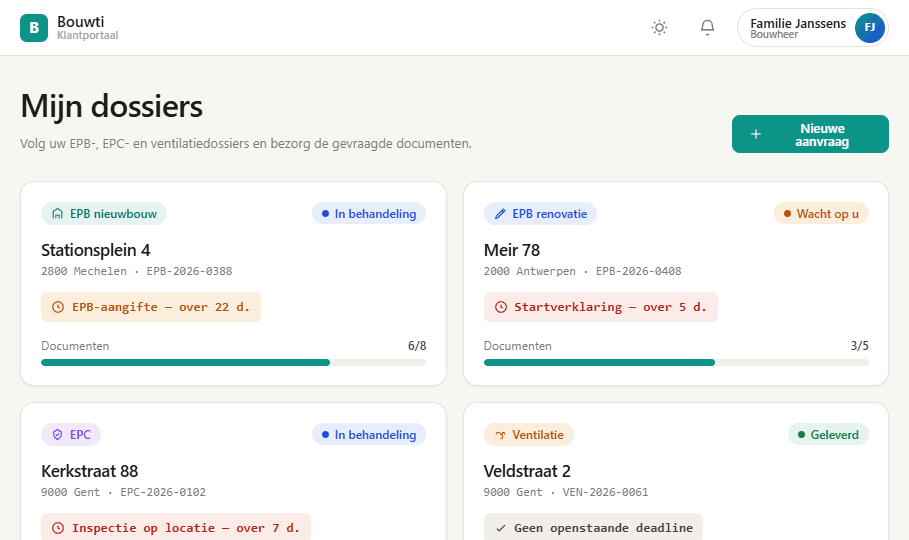
Your clients do the legwork — in their own portal.
A separate, mobile-first, Dutch-language portal where building owners and architects request work, upload the right documents the first time, and track progress without a single phone call.
Pick a service, enter the address & permit, drop the files — done.
Reject a file with a reason and the client re-uploads — no email ping-pong.
Clients see urgency the same way you do, so paperwork lands on time.
An AI colleague that already read every file.
Bouwti's AI mines every plan, permit, photo and prior certificate across all your clients — then fills the forms, drafts the reports and gets you ready to submit. You review, it does the typing.
Every AI tool, one workspace.
Nine capabilities that turn scattered files into filed certificates — available across every order and client.
Ask anything (prompts)
Chat over one order or a client's entire history — "list every U-value on file", "what changed since the 2021 EPC?" — grounded in your own documents.
Auto data-filling
Areas, U-values, ventilation systems and construction years land in the EPB & EPC fields automatically — you only confirm.
Certificate understanding
Reads existing EPB & EPC certificates and prior reports, extracts the reference values and flags what's changed on site.
Source-linked suggestions
Every suggested value carries a citation to the exact file and page it came from — one click jumps you to the proof.
EPB report generation
Drafts the complete energy-performance report in your office's template — sections, tables and calculations, ready to review.
EPC report generation
Produces the energy-performance certificate with the label, recommendations and cost estimates drawn from the mined data.
VEKA API upload
Packages the declaration to the government schema, validates it and submits over the VEKA API — then polls the status back.
Compliance & consistency checks
Cross-checks every value against the plans and the ruleset, flags missing documents and inconsistencies before you submit.
Automated email replies
Reads an inbound client or EPB-platform email in your connected inbox, gathers the answer from the order's files & status, and drafts a ready-to-send reply. Drafts wait for your approval by default; auto-send is off until you enable it per email type.
Client & portfolio intelligence
Understands every client's Studio data and dossier history — surfacing recurring buildings, reusable surveys and upsell openings.
From first call to final certificate.
CRM lead → quote → intake → site inspection → EPB report → government export → invoice. Everything linked to the project, nothing lost in email.
Everyone on the same dossier.
Project chat, file comments, built-in email and synced calendars. Outsource work to external partners with controlled access — they see only what they need.
Discussion lives next to the work, not buried in inboxes.
IMAP/SMTP mail and Google/Outlook calendars, connected to the order.
External partners get a restricted shell scoped to only their dossiers.
Six module groups. One order at the centre.
Everything in Bouwti orbits the order — the EPB dossier that moves through legal phases with real deadlines. Modules are role-gated per user.
Work core
Projects, orders & the EPB pipeline, EPB fine-risk monitoring, EPC certificates and government export.
Files & 3D
Studio workspace with DWG viewer/editor, in-browser SketchUp 3D, PDF & image viewers and ventilation-plan parsing.
Business
CRM for leads, clients, finance for quotes & invoices, and outsourcing to delegate work with controlled access.
Field
Intake forms and a structured site-inspection workflow that feeds measured data straight back into the order — on web at your desk, or on mobile on site.
Communication
Internal messages, project threads, file comments, DMs and channels, built-in email and synced calendars.
Insight
Dashboard, stats & KPIs and a full activity audit trail — the numbers behind capacity, billing and compliance.
Pay per seat. Add the modules you need.
Transparent per-user plans, plus optional power modules. Annual billing saves ~17.8%. Prices in EUR, excl. VAT.
Studio
/month
- Order pipeline (sheet & board)
- Up to 50 orders / month
- Clients & file management
- 20 GB storage / seat
- PDF & image viewer
- Email support
Office
/month
- Everything in Studio, plus:
- Unlimited orders
- 1-click VEKA export & polling
- DWG viewer + collaboration
- Statistics, activity & audit
- 100 GB storage / seat
- Priority support
Enterprise
- Everything in Office, plus:
- All modules included
- SSO (Google / Microsoft)
- Role-based access & audit export
- Unlimited storage
- Dedicated success manager & SLA
Switch on only what you use.
Add specialist capability to any plan. Toggle modules below to estimate your monthly bill.
Estimate your plan
Questions, answered.
Bouwti connects to the official energy-performance platform over its API. You push a completed declaration in one click and Bouwti polls the status back into the order. We only ever store the EPB project ID — the legal certificate stays registered on the government platform.
No. The DWG, SketchUp and PDF viewers run entirely in the browser — measure, dimension, mark up and read EPB data without any local install or per-machine licence.
Anytime. Add or remove seats and toggle modules from billing settings; changes are prorated to your next invoice. Annual plans keep their rate for the term.
All data is hosted in the EU. Company EPB credentials are encrypted and never shown in the interface — the form displays only the username and a "configured" indicator. Auth uses secure cookie sessions with CSRF protection.
External partners get a restricted shell that only shows the projects and threads they're added to — billed per partner via the Outsourcing module, separate from your internal team seats.
Yes — 14 days, full Office plan, no card required. Bring your real orders; if you subscribe, everything you set up carries over.
Stop chasing deadlines. Let Bouwti chase them for you.
Bring your real dossiers into a 14-day trial of the full Office plan. No card required.